This just in: you’ve got a review!
- 4 years ago
Activate your new Control Centre notifications
Keeping track of your customers’ incoming feedback has a myriad of benefits. With real-time notifications you can:
Quickly reply to negative reviews,
strengthen customer satisfaction,
display and share top reviews on your website and social media,
identify ways in which your brand can improve,
and more!
Trusted Shops has already made email notifications and eTrusted app notifications available to our members. To support your review management, we have released eTrusted Control Centre notifications for your incoming reviews!
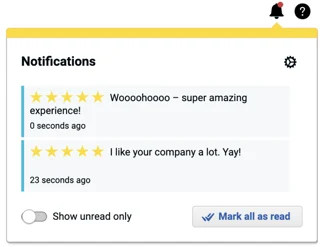
A Control Centre notification displays the star rating, a snippet of the written review, when the review was submitted, and the channel that it was submitted for.
These notifications are not activated by default. To activate them, head to your user setting in the eTrusted Control Centre. Found next to the email notification settings, you will be able to select whether you would like to activate Control Centre notifications for 1 & 2 star reviews, 3 star reviews, and/or 4 & 5 star reviews.
Your latest review notifications can then be found by clicking the bell symbol at the upper-right corner of your screen. From the bell symbol, you can also make a couple of adjustments such as only being shown unread notifications or marking all of your notifications as “read”.
Feedback on this feature?
Hi, I'm Christian and I'm the Platform Product Owner. Do you have feedback for this feature?